
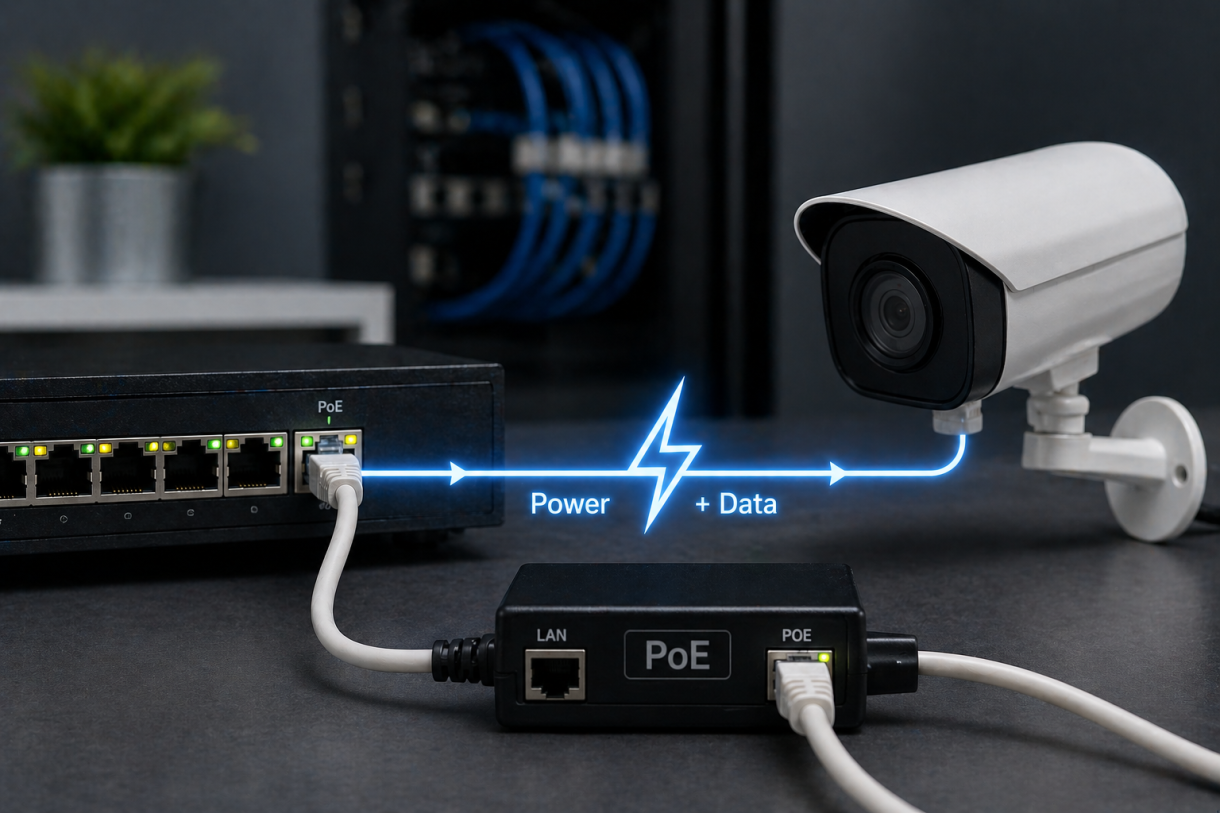
Over 80% of enterprise IP devices-cameras, phones, access points-run on Power over Ethernet today. And it all started with one standard that changed how we think about network power delivery. Is your infrastructure built on the right foundation?
What is standard 802.3af? Standard 802.3af is the original IEEE Power over Ethernet (PoE) specification, introduced in 2003, that allows network switches and injectors to deliver up to 15.4 watts of DC power over standard Ethernet cables alongside data. It eliminates the need for separate power outlets at each device location, cutting installation costs and simplifying network deployments.
At Pacoli Power, we work with electrical and network power systems where every watt and every connection matters. In one recent deployment, switching to properly planned 802.3af PoE infrastructure reduced installation costs by over 35% and eliminated the need for dozens of dedicated AC outlets across a facility.
In this guide, you'll learn exactly what the 802.3af standard covers, how 802.3af PoE delivers power, the classification system behind it, and how it compares to newer standards like 802.3at and 802.3bt. If you're also exploring power system testing and reliability, check out our guide on hipot testing. For the official standard documentation, refer to the IEEE Standards Association.
What Is Standard 802.3af? (Definition & Basics)
Ever plugged in an IP camera and wondered how it gets power without a separate outlet?
Here's the thing-before 2003, every networked device needed its own power cable. That meant extra wiring, extra electricians, and a lot of extra cost.
Standard 802.3af, officially known as IEEE 802.3af-2003, is the first Power over Ethernet specification that defines how to safely deliver up to 15.4 watts of DC power alongside data over standard Ethernet cables using two of the four twisted pairs. It was later incorporated as Clause 33 into the broader IEEE 802.3-2005 standard.
According to IEEE, the standard was designed to support 10BASE-T, 100BASE-TX, and 1000BASE-T connections-meaning it works across the most common Ethernet speeds without affecting data performance.
What surprises most people? They assume PoE degrades network speed. It doesn't. Power and data coexist on the same cable without interference.
What Does "802.3af PoE" Mean?
Let me simplify this.
"802.3af PoE" refers to the specific method of delivering power over Ethernet cables as defined by the IEEE 802.3af standard. Think of it like a universal language that your network switch and your IP camera both speak-so power gets delivered safely without frying anything.
802.3af PoE means the ability to transmit up to 15.4 watts of DC power at 44-57 volts over standard Cat5 or higher Ethernet cables from a Power Sourcing Equipment (PSE) to a Powered Device (PD), following the rules defined in IEEE 802.3af-2003.
In my experience, the biggest confusion happens around the power numbers. The PSE sends 15.4W, but only about 12.95W actually reaches the device. The rest dissipates as heat in the cable.
That difference matters when you're spec'ing equipment.
Now, let's look at the key specifications you need to know.
Key Specifications of Standard 802.3af
Here's where the numbers actually matter.
Because choosing the wrong PoE standard for your devices isn't just inefficient-it can mean devices that won't even power on.
The 802.3af standard operates at a voltage range of 44 to 57 volts DC, with 48V as the nominal supply, delivering a maximum of 15.4 watts per port from the PSE, with 12.95 watts guaranteed at the powered device after cable losses.
Here are the critical specs:
- Maximum PSE output: 15.4W per port
- Maximum PD input: 12.95W
- Voltage range: 44-57V DC (nominal 48V)
- Maximum current: 350 mA
- Cable requirement: Cat5 or higher
- Maximum cable distance: 100 meters (328 feet)
- Supported Ethernet speeds: 10/100/1000 Mbps
One detail most spec sheets skip-cable quality and ambient temperature directly affect how much power actually reaches the device. I've seen installations where cheap Cat5 cables caused enough power loss that devices randomly rebooted.
Next, let's understand how this standard actually detects and powers devices safely.
How Does 802.3af PoE Work? Step-by-Step Process
Most people think it's simple: plug in the cable, and power flows.
It's not that simple-and that's actually a good thing.
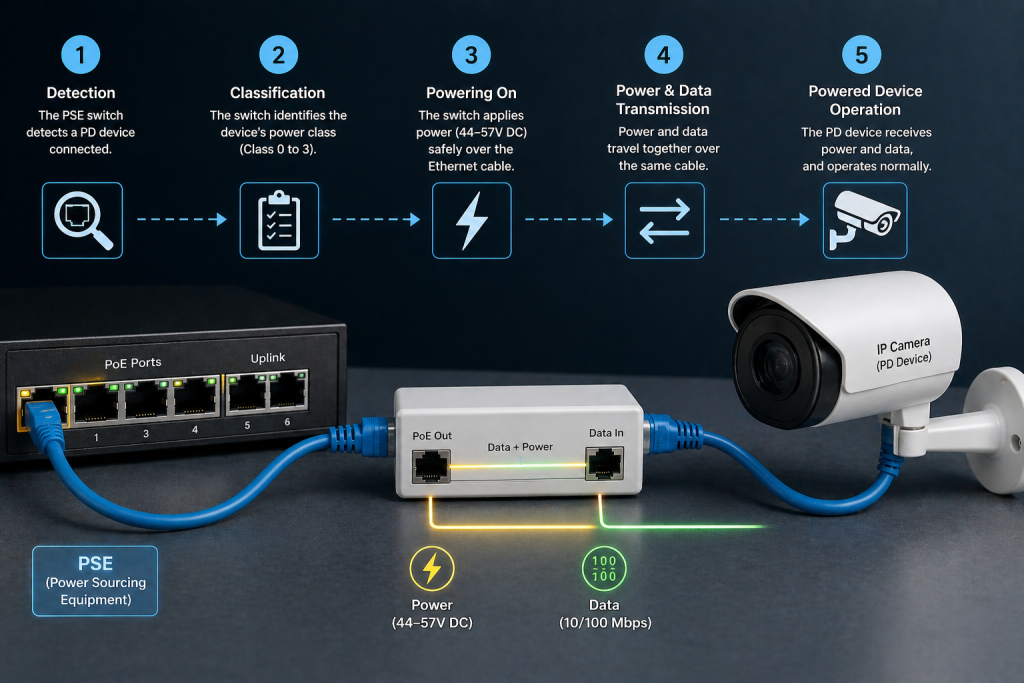
802.3af PoE works through a controlled negotiation process where the Power Sourcing Equipment detects a compatible device, classifies its power needs, and only then delivers the appropriate voltage-protecting non-PoE devices from damage.
The safety built into this process is what makes 802.3af so reliable. Without it, plugging a regular laptop into a PoE port could damage the network interface.
According to IEEE documentation, the detection and classification protocol is specifically designed to distinguish compatible devices from incompatible ones before any significant power is applied.
Let me walk you through each step.
Step 1: Detection - Finding a Compatible Device
This is the safety gate. And it's brilliant in its simplicity.
The PSE periodically sends a small probe voltage-between 2.7V and 10.1V-to check if a compatible powered device is connected. That voltage is far too low to damage anything.
During detection, the PSE looks for a specific resistance signature from the device-a 25k ohm resistor built into every 802.3af-compliant powered device. If the resistance falls within the valid range of 23-26k ohms, the PSE recognizes it as a legitimate PoE device and moves to the next step.
Here's what I find clever about this: if you plug in a regular laptop, printer, or any non-PoE device, the resistance signature won't match. The PSE simply won't apply power. No damage, no drama.
I've seen people worry about plugging non-PoE equipment into PoE switches. They shouldn't. The detection protocol handles it.
Key Takeaway: Detection protects your equipment-the PSE won't deliver power unless it confirms a compatible device is connected.
Step 2: Classification - How Much Power Does It Need?
Once the PSE knows a valid device is connected, it needs to figure out how much power to allocate.
This is where classification comes in.
Classification is an optional step under 802.3af where the PSE increases voltage to 15.5-20.5V and measures how much current the device draws to determine its power class, allowing the PSE to manage its total power budget more efficiently.
Here are the 802.3af power classes:
| Class | Maximum Power at PD | Typical Devices |
|---|---|---|
| 0 | 12.95W (default) | Unclassified devices |
| 1 | 3.84W | Basic sensors, simple IoT |
| 2 | 6.49W | IP phones, basic cameras |
| 3 | 12.95W | Wireless access points, advanced cameras |
What surprised me when I first learned this? Classification is actually optional under 802.3af. If a device doesn't provide a classification signature, the PSE treats it as Class 0 and allocates the full 12.95W.
That sounds wasteful-and it can be. If you have a 24-port switch and every device defaults to Class 0, you're reserving far more power budget than most devices actually need.
Pro Tip: When planning a PoE deployment, always check your devices' actual power class-not just whether they support 802.3af. Proper classification lets you connect more devices per switch.
Step 3: Power Delivery - Turning On the Juice
Now the PSE knows what's connected and how much power it needs.
Time to deliver.
After successful detection and classification, the PSE ramps its output voltage above 42V and applies power to the Ethernet cable pairs, allowing the powered device to begin normal operation while the PSE continuously monitors for proper load conditions.
There are two ways 802.3af delivers power over the cable:
- Mode A (Alternative A): Power is applied over the data pairs (pins 1-2 and 3-6). This is what endspan PSEs-like PoE switches-typically use.
- Mode B (Alternative B): Power is applied over the spare pairs (pins 4-5 and 7-8). This is what midspan injectors use.
Here's something most guides skip: the powered device must accept power from either mode. That's a requirement of the standard. But the PSE only needs to support one mode.
I've run into compatibility issues where a midspan injector using Mode B couldn't power a device that was technically compliant. Turned out the device had a wiring issue on the spare pairs. Always check your cabling.
Step 4: Monitoring and Disconnect
The PSE doesn't just turn on power and walk away.
It watches continuously.
During operation, the PSE monitors the powered device's Maintain Power Signature (MPS) to confirm the device is still connected and drawing current. If current drops below a threshold for a set time, the PSE removes power to prevent wasted energy and potential hazards.
This is smart power management. If you unplug a camera, the switch detects the loss almost immediately and shuts off power to that port.
In one installation I worked on, a technician couldn't figure out why a PoE port kept cycling. Turned out the device was drawing current just below the MPS threshold-the switch kept thinking it was disconnected. A firmware update on the camera fixed it.
Pro Tip: If a PoE device keeps losing power intermittently, check its current draw against the MPS detection threshold before blaming the switch.
Why Standard 802.3af Still Matters Today
Here's a hard truth: plenty of people dismiss 802.3af as "old tech" because newer standards exist.
That's a mistake.
Standard 802.3af still matters because the majority of low-power network devices-VoIP phones, basic IP cameras, access control readers, and IoT sensors-operate well within its 12.95W limit, making it the most cost-effective PoE option for large-scale deployments.
According to industry reports, VoIP phones and basic security cameras remain the two most widely deployed PoE device categories globally. Most of them need less than 13W.
In my experience, over-specifying PoE is one of the most common-and most expensive-mistakes in network design.
Let me explain why.
Cost Advantages of 802.3af PoE
This isn't just about technology. It's about money.
802.3af PoE reduces deployment costs by eliminating separate power infrastructure for each device, requiring only standard Cat5 cabling, and using switches with lower power budgets that cost significantly less than higher-wattage alternatives.
Here's what the savings actually look like:
- No separate AC outlet per device (saves $150-$300 per location in electrical work)
- No need for an electrician at every device location
- Single cable run for data and power
- Lower-wattage PSE equipment is cheaper to buy and operate
- Reduced cooling costs in wiring closets
I worked on a project where a facility needed 200 IP phones deployed across three floors. Using 802.3af PoE switches instead of running individual power to each phone location saved over $40,000 in electrical work alone.
That's real money.
Common Devices That Use 802.3af PoE
You might be surprised how many everyday network devices still run perfectly on 802.3af.
Many common network devices including VoIP phones, fixed IP cameras, single-band wireless access points, access control readers, and IoT sensors operate well within the 802.3af power envelope of 12.95 watts.
Here's a quick breakdown:
| Device Type | Typical Power Draw | 802.3af Sufficient? |
|---|---|---|
| VoIP phones | 5-7W | Yes |
| Fixed IP cameras | 4-12W | Yes |
| Basic wireless APs | 6-12W | Yes |
| Access control readers | 3-5W | Yes |
| IoT sensors | 1-4W | Yes |
| PTZ cameras | 20-30W | No - needs 802.3at+ |
| Wi-Fi 6E/7 APs | 25-50W | No - needs 802.3at/bt |
What most people get wrong? They see a device labeled "PoE compatible" and assume it needs the latest standard. Most don't. Always check the actual wattage on the spec sheet.
802.3af vs 802.3at vs 802.3bt: Key Differences
People mix these standards up constantly.
And the naming doesn't help-PoE, PoE+, PoE++, 4PPoE, UPoE. It gets messy fast.
Let me clear it up.
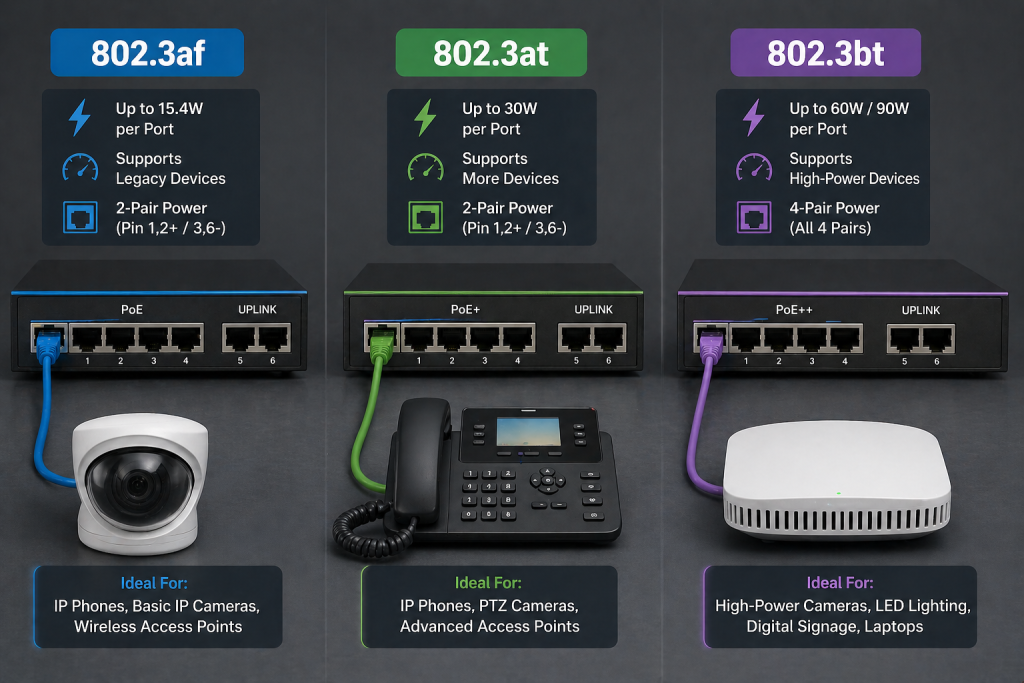
The three main IEEE PoE standards differ primarily in maximum power output: 802.3af delivers up to 15.4W, 802.3at delivers up to 30W, and 802.3bt delivers up to 60W (Type 3) or 90W (Type 4), with each newer standard being backward compatible with the previous ones.
Here's the comparison that actually matters:
| Feature | 802.3af (PoE) | 802.3at (PoE+) | 802.3bt (PoE++) |
|---|---|---|---|
| Year Introduced | 2003 | 2009 | 2018 |
| Max PSE Power | 15.4W | 30W | 60W / 90W |
| Max PD Power | 12.95W | 25.5W | 51W / 71W |
| Voltage Range | 44-57V | 50-57V | 50-57V |
| Cable Pairs Used | 2 | 2 | 4 |
| Minimum Cable | Cat5 | Cat5 | Cat5e (Cat6a recommended) |
| Type Designation | Type 1 | Type 2 | Type 3 / Type 4 |
Here's the critical detail: backward compatibility. An 802.3bt switch can power an 802.3af device with no issues. But an 802.3af switch cannot power a device that requires 802.3at or higher.
I've seen this cause problems more than once. A customer bought PTZ cameras rated for 802.3at, plugged them into an older 802.3af switch, and couldn't figure out why they wouldn't power on. The cameras needed 25W-the switch could only deliver 12.95W to the device.
Simple fix, but costly if you've already run all the cables.
When to Use 802.3af vs Newer Standards
Short answer? It depends entirely on what you're powering.
Use 802.3af when your devices need 13W or less, use 802.3at for devices up to 25.5W, and choose 802.3bt for anything above that-but always check each device's actual power specification rather than guessing.
Here's how I usually decide:
Choose 802.3af when:
- Deploying VoIP phones
- Installing fixed security cameras
- Setting up basic wireless access points
- Adding IoT sensors or access readers
- Budget is a primary concern
Choose 802.3at when:
- Using PTZ security cameras
- Deploying Wi-Fi 6 access points
- Running video IP phones
- Powering multi-radio wireless devices
Choose 802.3bt when:
- Installing LED lighting systems
- Deploying Wi-Fi 7 access points
- Running digital signage
- Powering thin clients or laptops
What surprised me early in my career is how often people default to the newest, most powerful standard "just in case." That drives up costs for switches, power supplies, and even cooling-with zero benefit if none of your devices actually need more than 13W.
Pro Tip: Plan for the next 3-5 years. If you're deploying Wi-Fi 6E access points soon, spec your switches for 802.3at now-even if your current APs only need 802.3af.
How to Set Up an 802.3af PoE System
Let me walk you through what a real deployment looks like.
Because spec sheets are one thing-actual implementation is where problems hide.
Setting up an 802.3af PoE system involves selecting compatible PSE equipment, verifying device power requirements, ensuring proper cabling, calculating total power budget, and testing each connection before full deployment.
I've set up dozens of these systems, and the most common mistakes all happen in the planning phase-not during installation.
The Right Power Sourcing Equipment
You have two main options: PoE switches or midspan injectors.
For 802.3af deployments, your PSE choice depends on scale-use PoE-capable switches for new installations with multiple devices, and midspan injectors when adding PoE to existing non-PoE switches for just a few devices.
PoE Switches (Endspan PSE):
- Built-in PoE on every port
- Cleaner installation
- Better for new deployments
- Available from Cisco, HPE/Aruba, Juniper, Ubiquiti, and others
Midspan Injectors:
- Sit between existing switch and device
- No need to replace your current switch
- Better for small additions to existing networks
- Single-port or multi-port options available
Here's a mistake I see constantly: people forget to check the switch's total power budget. A 24-port PoE switch might support 802.3af on every port-but only if the total power budget supports it. A switch with a 200W budget can only power about 13 devices at full 802.3af load (15.4W × 13 = 200.2W).
Always check the total power budget, not just the per-port rating.
Cable Requirements and Distance Limits
The cable you use matters more than most people realize.
802.3af requires a minimum of Cat5 cable and supports a maximum cable distance of 100 meters between the PSE and powered device, but cable quality, connector integrity, and environmental conditions all affect actual power delivery performance.
Here's what you need to know:
- Cat5 is the minimum requirement for 802.3af
- Cat5e or Cat6 is recommended for reliability
- 100 meters maximum from switch to device (including patch cables)
- Ambient temperature affects cable resistance and power loss
- Cable bundle size matters-tightly packed cables generate more heat
What surprised me? Even within 100 meters, cheap cables or poorly terminated connectors can cause enough voltage drop that devices at the far end struggle to power on reliably.
I once troubleshot an intermittent camera issue that turned out to be a bad crimp on a single connector 85 meters from the switch. The voltage drop was just enough to cause the camera to reboot every few hours.
Pro Tip: For runs over 75 meters, use Cat6 cable with solid conductors. The lower resistance makes a real difference in power delivery.
802.3af PoE Safety: What You Need to Know
One question I hear often: Is PoE safe?
The short answer-yes, when implemented according to the standard.
802.3af PoE is designed to be inherently safe, operating at voltages below 60V DC (which is considered Safety Extra Low Voltage in most jurisdictions), with built-in detection protocols that prevent power delivery to non-compatible devices.
According to OSHA guidelines, voltages below 50V DC are generally considered low-risk for electrical shock in dry conditions. The 802.3af standard operates in this range.
But "safe by design" doesn't mean you can ignore best practices.
Built-In Safety Features
The 802.3af standard includes multiple layers of protection.
Safety mechanisms built into 802.3af include device detection before power delivery, overcurrent protection, automatic disconnect on device removal, and continuous monitoring of powered devices to prevent overload conditions.
Here's what protects you:
- Detection protocol - power only flows to valid PoE devices
- Overcurrent protection - PSE limits current to prevent cable damage
- Automatic disconnect - power shuts off when a device is unplugged
- Inrush current limiting - prevents voltage spikes during power-up
- Thermal protection - shuts down ports if temperature exceeds safe limits
One thing that surprised me-802.3af even addresses the inrush current problem. When a device first powers on, the initial current surge is limited to 400mA for no more than 50ms. That protects both the cable and the device.
Common PoE Mistakes to Avoid
Let me share what I see go wrong most often.
Not beginner mistakes-these are errors experienced technicians make.
The most common 802.3af PoE mistakes include exceeding the total power budget, using substandard cables on long runs, ignoring environmental temperature effects, and assuming all "PoE compatible" devices use the same power class.
Here are the big ones:
- Overloading the power budget - plugging in more devices than the switch can power
- Using patch-quality cable for long runs - stranded cable has higher resistance
- Ignoring temperature - hot cable trays reduce effective power delivery
- Not verifying compatibility - assuming "PoE" on a label means 802.3af
- Forgetting midspan injector placement - it counts toward the 100m distance limit
One incident I remember clearly-a customer's 48-port PoE switch was supposed to power 48 cameras. But the total power budget was only 370W. At full 802.3af load, 48 devices need 739W. Half the cameras simply wouldn't power on, and the tech couldn't figure out why each individual port "supported PoE."
That's the power budget trap.
FAQs About Standard 802.3af (People Also Ask)
Question: What is the maximum power output of 802.3af?
Answer: The 802.3af standard allows a PSE to output up to 15.4 watts per port, but after accounting for cable power loss, only 12.95 watts is guaranteed to reach the powered device. Always design your system around the 12.95W delivered figure, not the 15.4W source figure.
Question: Can 802.3af damage non-PoE devices?
Answer: No. The 802.3af standard includes a mandatory detection protocol that checks for a valid 25k ohm resistance signature before applying power. If a non-PoE device is connected, the PSE will not deliver power, so there is no risk of damage to standard network equipment.
From my experience, this is the most common concern-and it's completely addressed by the standard's design.
Question: Is 802.3af backward compatible with 802.3at and 802.3bt?
Answer: Yes, but only in one direction. A newer 802.3at or 802.3bt switch can power an 802.3af device without issues. However, an 802.3af switch cannot power devices that require the higher wattage of 802.3at or 802.3bt standards.
Question: What cable do I need for 802.3af PoE?
Answer: The minimum requirement is Cat5 cable, but Cat5e or Cat6 is recommended for better performance and lower power loss, especially on cable runs approaching the 100-meter maximum distance.
Question: Can I add PoE to an existing non-PoE switch?
Answer: Yes. Midspan PoE injectors sit between your existing switch and the powered device, adding 802.3af power without replacing your switch. Single-port injectors work for individual devices, while multi-port injectors handle larger deployments.
Final Thought
Remember that stat about 80% of enterprise IP devices running on PoE? Now you understand exactly what makes that possible-and it starts with the 802.3af standard that launched it all back in 2003.
Here's what you should do next: audit your current network devices' actual power draw, compare it against the 802.3af 12.95W limit, and only upgrade to higher PoE standards where devices genuinely need more power. Always calculate your total power budget before deploying, and never skip cable quality checks on long runs.
At Pacoli Power, we apply these same principles to power system design and testing-making sure every component, from cables to connections, performs reliably under real-world conditions. Whether you're deploying your first PoE network or upgrading an existing system, getting the standard right at the start saves you time, money, and headaches down the road.


